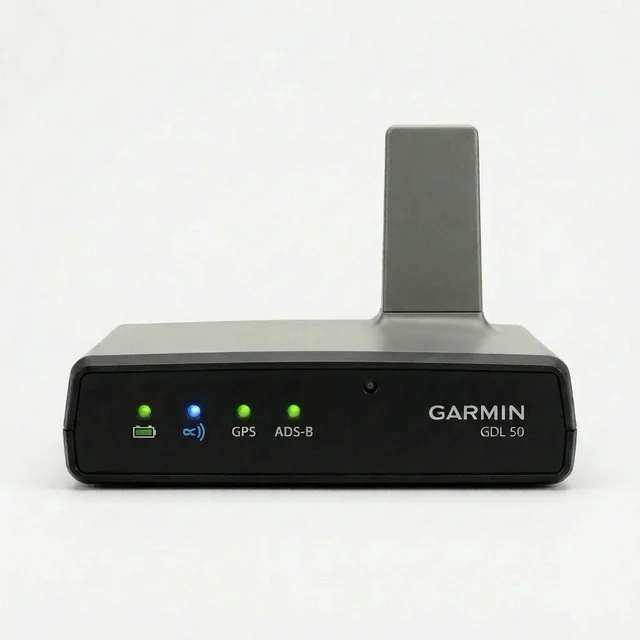
Garmin GDL 50 flight data log — export & score every landingBeta
Your GDL 50 is already logging. Plug it in over micro-USB, grab your log file from the Garmin › Logs folder, and upload it to landing.fyi.
Covers: GDL 50 portable ADS-B / GPS receiver
Step 1
1) Fly with the GDL 50 powered on
There’s nothing to switch on — power it up, and it logs. Two things worth
checking before you taxi:
The GPS LED is green — that’s your GPS fix. No fix, no position, no landing to score.
The unit is where it can see sky (a glareshield is what it’s designed for), not face-down in a flight bag.
Green GPS LED = you have a fix. The GDL 50 logs on its own.
Don’t let it nap
On battery alone, with no display connected, the GDL 50 switches itself off once
you’re slower than 20 kt or lose GPS — its battery-saver feature. Running it on
external power (or keeping Garmin Pilot connected over Bluetooth) keeps it awake through a
long taxi or a stop-and-go.
Step 2
2) Plug it into a computer
Back on the ground, connect the GDL 50 to a computer with the micro-USB cable that came in
the box. The port is on the left end of the unit, next to the power button — the
front only has the status lights. The unit shows up as a drive.
The micro-USB port is on the left end of the unit, beside the power button.
No drive showing up?
Hold the power button for 3 seconds while the unit is booting up — the GPS and
ADS-B LEDs flash orange to show it’s in USB mass-storage mode. Press the power
button again to leave it.
Step 3
3) Copy the log and upload it
On the GDL 50’s drive, open the Garmin folder, then Logs. Your flights are
the .csv files in there — grab the log file matching your flight’s
date and time (or just take the lot; landing.fyi quietly ignores duplicates).
Open the Garmin folder, then Logs, and grab the log file for your flight.
On a computer
The GDL 50 mounts like a USB stick — open it and go into Garmin, then
Logs.
On a phone or iPad
Pair the GDL 50 with Garmin Pilot over Bluetooth and export the log file from the
app — no computer needed. Then upload it here from the same device.
What a GDL 50 can and can’t score
A GDL 50 logs position, pressure altitude, groundspeed and sink rate — enough for
flare quality, descent-rate stability, centreline accuracy and rollout. But it has
no pitot, so there’s no touchdown airspeed, and it can’t measure touchdown
firmness. That’s 4 of the 6 signals a landing is scored on — so every
GDL 50 landing is marked low-confidence and sits out of leaderboards and medals. You
still get the score, the trace and the trend; it just doesn’t stack up against
panel-mount data.
Want feedback on your own landings?
landing.fyi scores every landing 0–100 from your avionics log — approach, glidepath, centerline, flare, firmness. Find your greaser.
 landing.fyi